
Project Delivery, Organised
A pre-built ClickUp workspace for agencies and consultancies managing projects across multiple clients. Dashboards at every level, automated risk alerts, a standardised intake process, and an AI agent that watches your portfolio health so nothing slips through.
Explore the Template
Click through the key screens to see what you get. Tap the markers to learn what each part does.
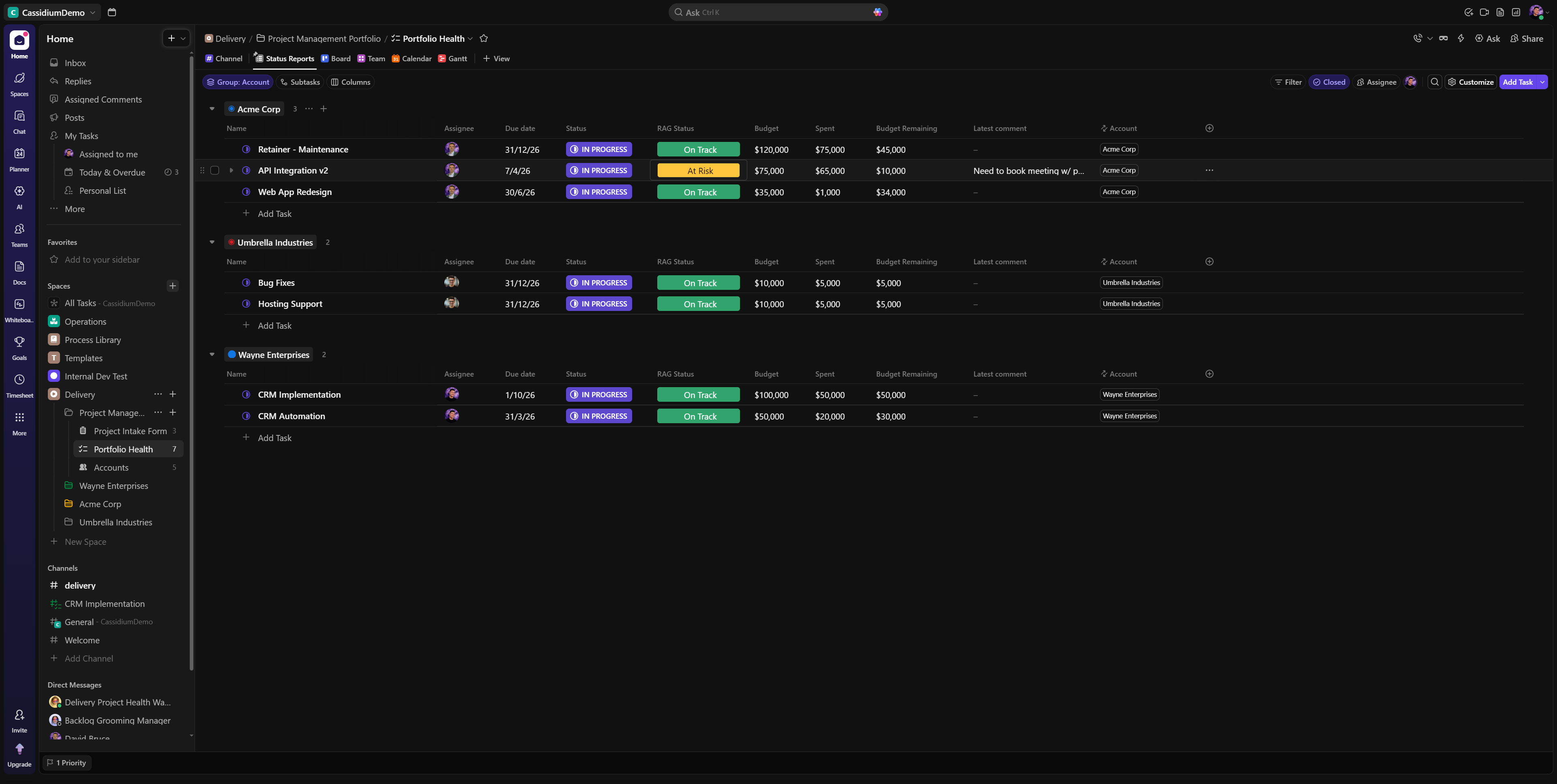
Everything You Need to Deliver Client Projects
A complete delivery management system out of the box. From portfolio-level visibility down to individual task tracking, every layer is pre-configured with the dashboards, views, and automations that delivery teams actually need.
Built Around How You Actually Deliver
The workspace mirrors a real delivery organisation. Three levels keep everything tidy as you scale from one project to dozens.
Delivery Space
The top-level container for all delivery work. Houses your portfolio health dashboard and cross-project views.
Client Folder
Each client gets their own folder with a dedicated dashboard showing all their projects, status, and budget at a glance.
Project List
Individual projects live here with task breakdowns, timelines, team workload views, and project-level dashboards.
What's Inside
Overall Portfolio Dashboard
See every project across every client in one view. Track status, budgets, risk flags, and upcoming milestones without opening a single project.
Delivery Dashboard
Your delivery lead's command centre. AI-generated project updates, portfolio health automations, intake form submissions, and a real-time view of what needs attention.
Client Dashboard
Per-client overview with executive summary, active projects, workload distribution by status, and task breakdown by assignee. Share with stakeholders or use internally.
Project Dashboard
Deep project-level analytics including AI progress updates, milestone tracking, priority breakdowns, status distributions, and weekly task completion trends.
Project Task List
Structured task management with phases, priorities, due dates, time estimates, and custom fields. Pre-configured with common delivery phases from discovery through go-live.
Project Intake Form
Standardised form for new project requests. Captures project name, client, description, priority, budget, and timeline. Submissions automatically create tasks and notify the delivery channel.
Team Workload View
Timeline-based workload view showing who is working on what, when. Spot overallocation and capacity gaps across your delivery team at a glance.
Delivery Watchdog AI Agent
An AI agent that monitors your portfolio and flags risks before they become problems. Tracks overdue tasks, blocked work, and budget concerns, then posts structured updates to your delivery channel.
Automations That Keep You Ahead
Five built-in automations ensure your team is always aware of what matters. No manual status chasing required.
When a due date passes and the task is not complete
When status changes to "At Risk" or "On Hold"
When a task is unblocked
When priority changes to High or Urgent
When the project intake form is submitted
Who This Is For
Agencies & Studios
Running concurrent projects for different clients and need a single source of truth for delivery status.
Consultancies
Managing multiple client engagements with different timelines, budgets, and team allocations.
Delivery Leads & PMOs
Need portfolio-level visibility without manually consolidating updates from every project.
Growing Service Teams
Scaling from a handful of projects to a structured delivery operation with consistent processes.
Extend This Template
The template works out of the box, but it really shines when connected to the systems your agency already runs on. Customise it to fit your workflow and integrate with the tools your team uses every day.

HubSpot
Sync deals, contacts, and lifecycle stages so your delivery team sees the full client picture without switching tabs.
Pipedrive
Automatically create delivery projects when deals close. Pull pipeline data into your portfolio dashboards.

Xero
Connect invoicing and financials to project budgets. Track profitability per client and flag projects trending over budget.

Zoho
Connect Zoho CRM, Books, or Projects to your delivery workspace. Sync client data, invoices, and project status across both platforms.

Slack & Teams
Route delivery alerts, status changes, and AI watchdog reports directly into your team's channels.
And More
ClickUp integrates with hundreds of tools natively and via Make or Zapier. We can help you connect whatever your team relies on.
Frequently asked questions
Common questions about clickup project delivery template.
Do I need a specific ClickUp plan to use this template?
The template works on ClickUp's Business plan and above. Some features like automations and dashboards require Business tier. The AI Watchdog Agent requires ClickUp Brain, available as an add-on or included in the Enterprise plan.
Can I customise the dashboards and automations?
Absolutely. Everything in the template is fully editable. Add custom fields, modify automation triggers, rearrange dashboard widgets, or add entirely new views to suit your workflow.
How do I install the template?
After purchase, you'll receive a ClickUp template link. Click it while logged into your ClickUp workspace, choose which space to import it into, and the entire structure, dashboards, automations, and views will be created automatically.
What types of projects does this work for?
Any client-facing project delivery. The structure and automations are designed for agencies, consultancies, and service teams managing multiple client engagements. The phases and intake form can be adjusted to fit your specific project types.
What if I need help setting it up?
We offer ClickUp implementation and training services. If you'd like hands-on help configuring the template for your team, get in touch and we'll tailor it to your specific workflow.
Can I use this across multiple workspaces?
The template is licensed for use in a single ClickUp workspace. If you need it across multiple workspaces, contact us for volume licensing.
Ready to Get Started?
Get the complete template installed in your workspace in minutes. Includes all dashboards, automations, views, and the AI Watchdog Agent.