Monday.com to ClickUp Migration
Whether you have outgrown Monday.com, need deeper project management capabilities, or are consolidating platforms across teams, the migration itself should not be the hard part. We handle the data, the structure, the integrations, and the cleanup, so your team lands in a ClickUp workspace that is better than what they left behind.


How We Work
A migration is really a chance to set things up properly. We use our own proprietary tooling to handle the repetitive work so we can spend our time on the parts that matter: understanding how your team works, designing a structure that fits, and making sure the transition is smooth.
We learn how you work
Before anything moves, we need to understand what you have. We connect to your Monday.com workspace and run a full scan: every board, every column, every automation, every integration. Within minutes we have a complete picture of your setup, including which boards are heavily used, which are collecting dust, and where things are connected to other systems. This is the kind of audit that takes days to do by hand, and it means we are making recommendations based on facts, not guesses.
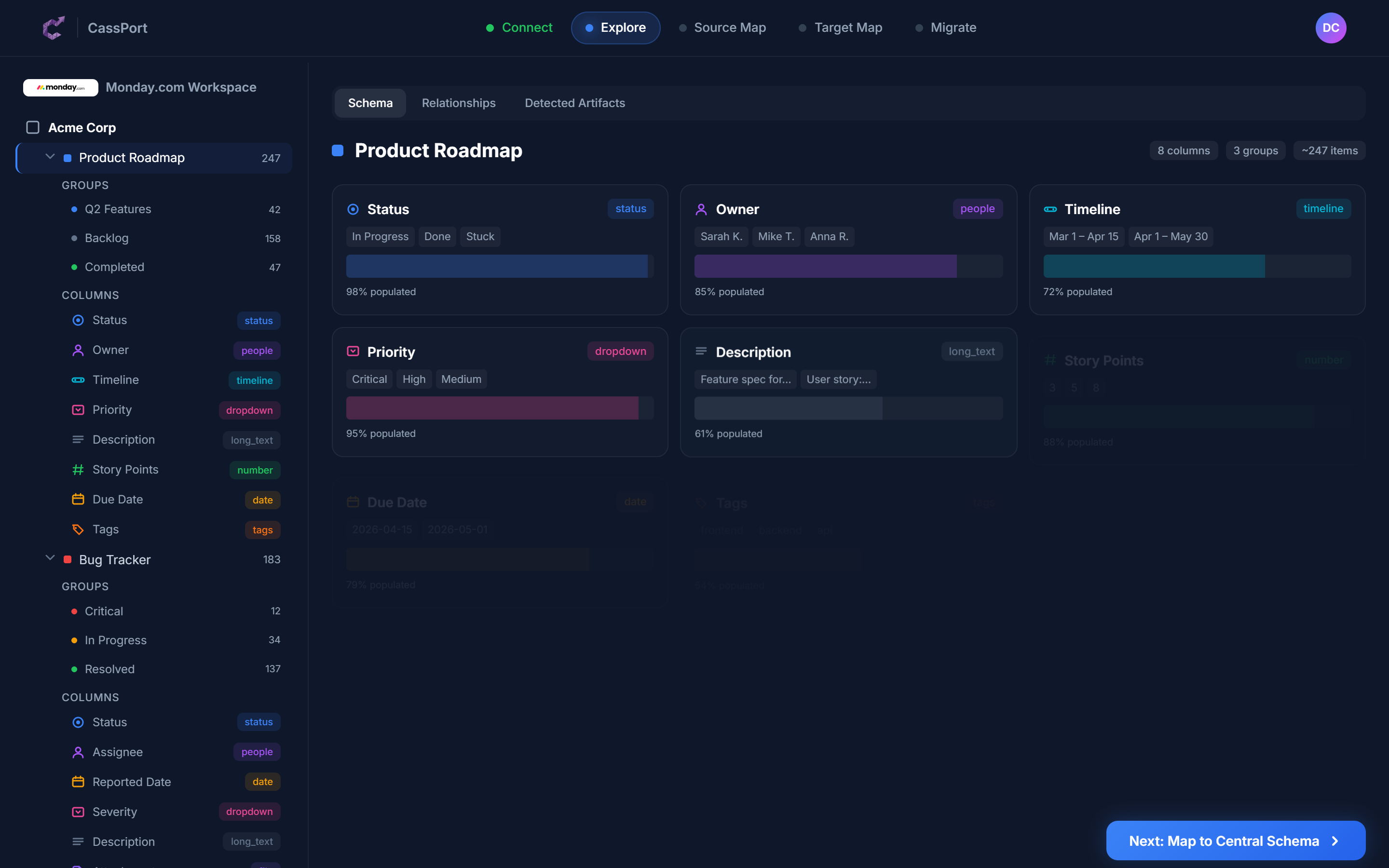
A complete map of your Monday.com workspace, generated in minutes
We design your new workspace
This is the step most migration providers skip. Rather than copying your Monday.com structure into ClickUp as-is, we sit down with your team and ask the right questions. Which boards should be combined? Which groups are really statuses? Are there workflows that never quite worked and could be done better in ClickUp? Our tooling generates a starting point for how your data should map across, and then we refine it based on how your team actually operates. The result is a ClickUp workspace designed around your needs, not a copy of your old one.
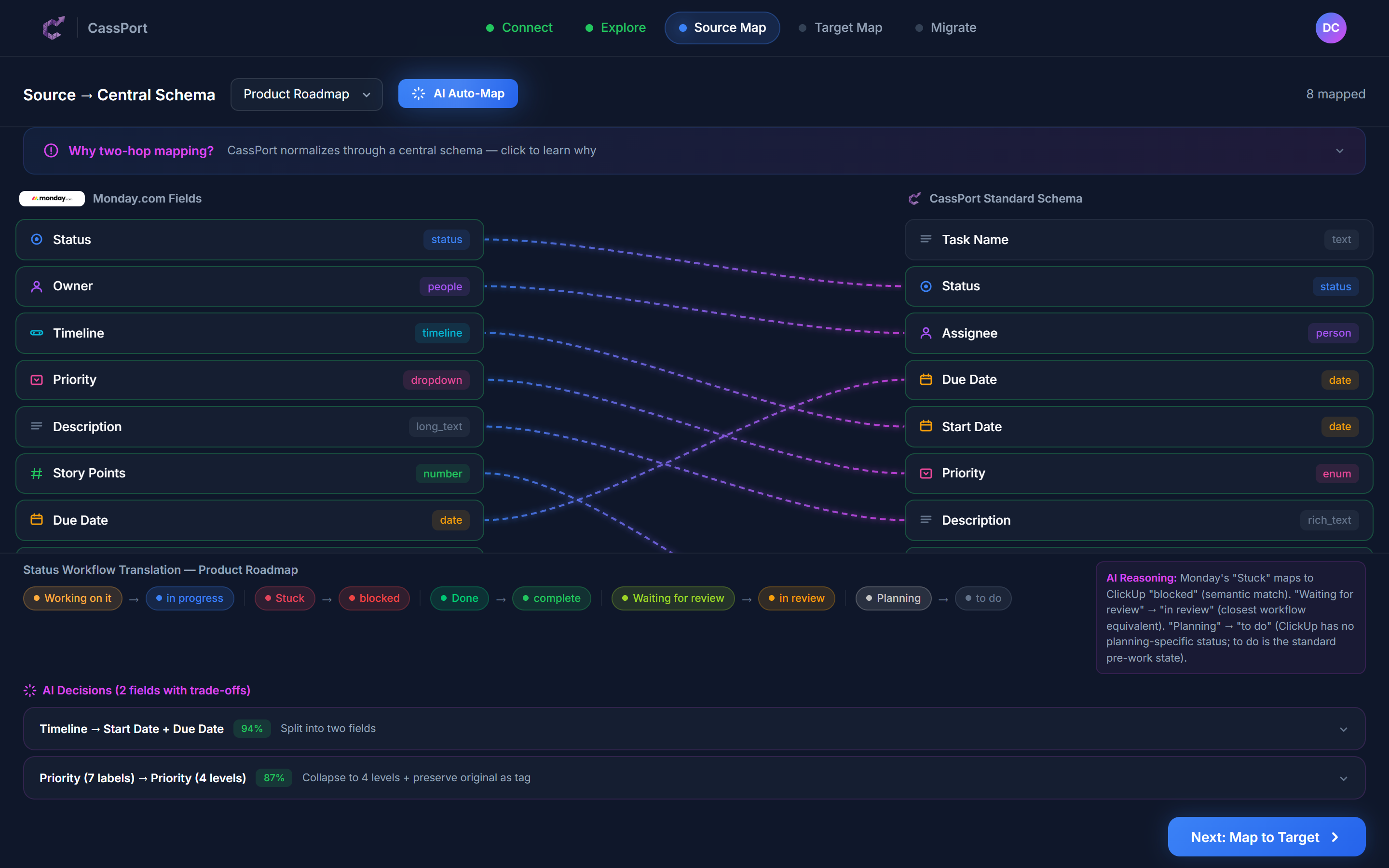
Our tooling generates a starting point. Your Cassidium consultant refines it with your team.
You review and approve
Nothing moves until you are comfortable with where it is going. We walk your team through the proposed structure, explain every decision, and adjust based on your feedback. This is also when we identify automations that need rebuilding, dashboards that need redesigning, and integrations that need reconnecting. By the time we start moving data, everyone knows exactly what the new workspace will look like and why.
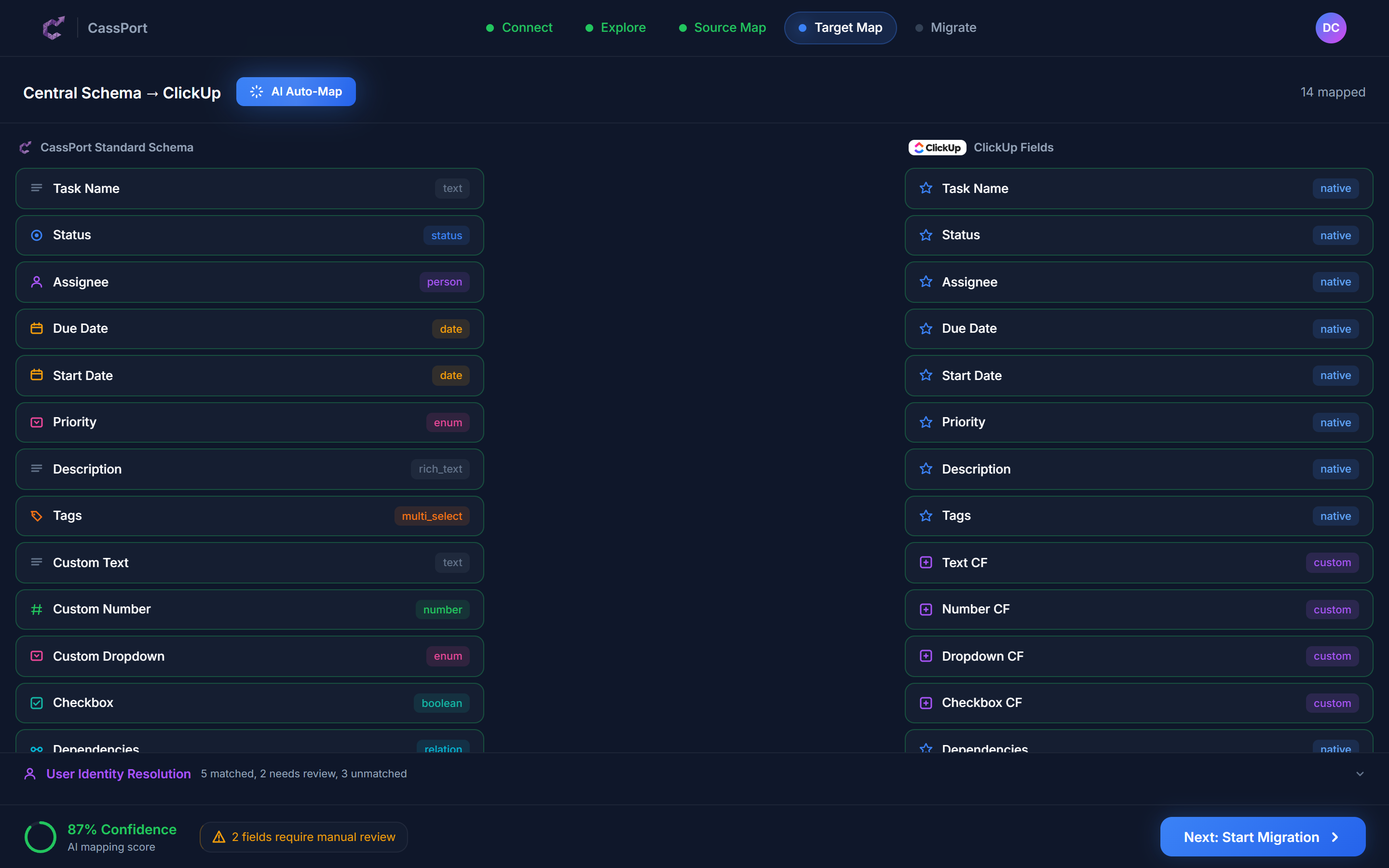
You see exactly where everything is going before we move a single record
We move your data and get your team live
Data moves across in controlled stages, not all at once. Every record is tracked so if anything looks off, we can find the source, fix it, or roll it back. Your team keeps working in Monday.com throughout the build-out and validation phases. When it is time to cut over, we schedule a brief freeze window so we can move the final data cleanly, without chasing a moving target. We reconnect your integrations, rebuild your automations, and run your team through the new workspace so they are confident before the switch.
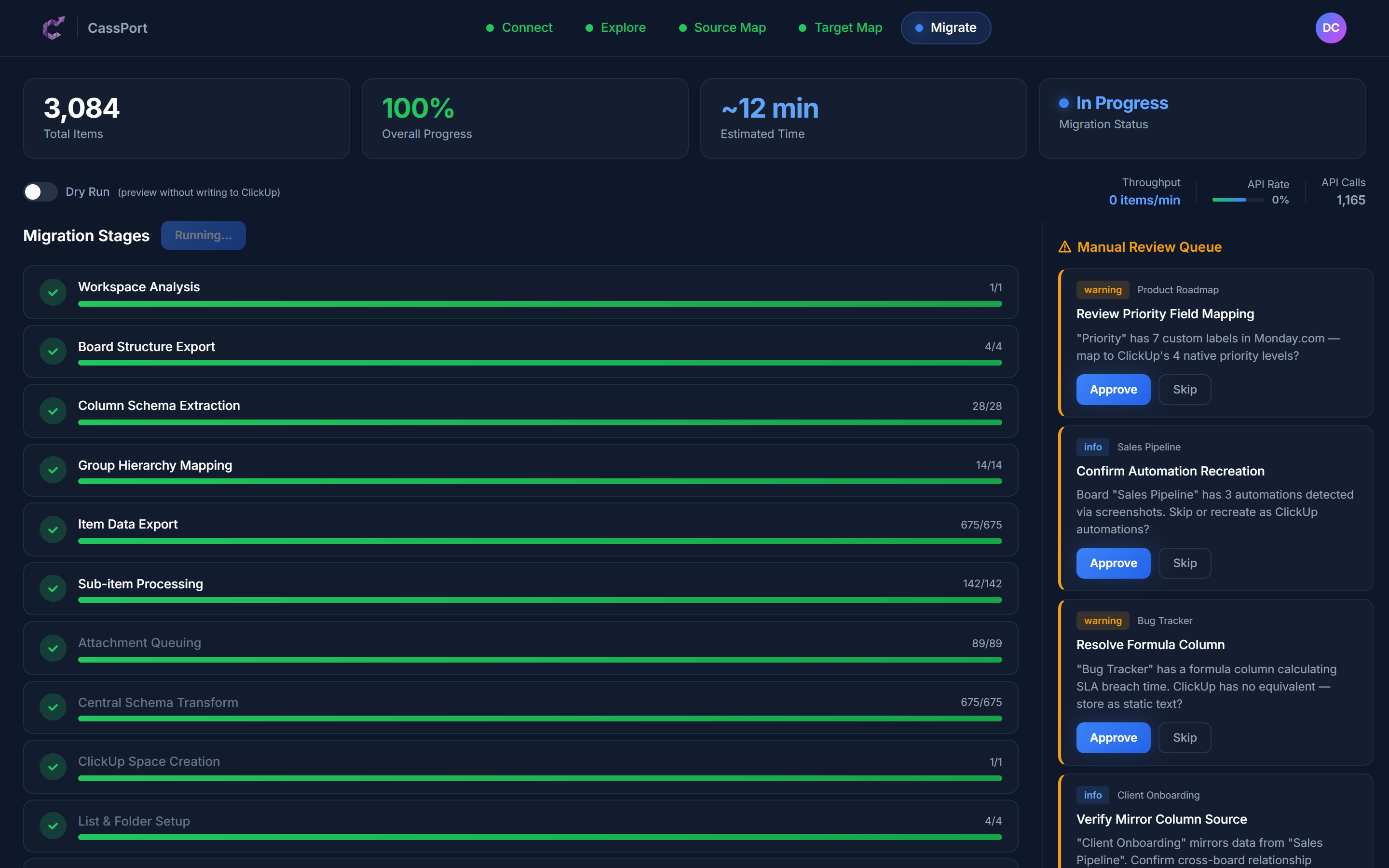
Every stage tracked, every record accounted for
Your Safety Net
Migrations carry risk. We have built our process specifically to reduce that risk at every step, so you are never in a position where something goes wrong and there is no way back.
Nothing is permanent until you say so
Every record we move is tracked. If something does not look right in ClickUp, we can trace it back, understand what happened, and reverse it. You are never stuck with a migration you are not happy with.
We check the numbers
After each phase, we verify that what landed in ClickUp matches what left Monday.com. Task counts, file counts, comment counts: everything is cross-checked before we move on.
Every record is logged
We track what was created, what was updated, what was skipped, and why. If a question comes up three months later, we have the answer.
Your other tools keep working
Monday.com does not exist in a vacuum. We find every connected system, app, and integration, and reconnect them to ClickUp. Whether that means a native integration, a Make.com or Zapier workflow, or a custom connection, nothing in your tech stack gets left behind.
Direct line to ClickUp
As a ClickUp Certified Partner, we have direct access to ClickUp's engineering and support teams. If something unusual comes up during your migration, we escalate it directly rather than waiting in a queue.
We are here after go-live
Every migration includes a support window after launch. If your team hits a snag, has questions, or wants to adjust how something is set up, we are still available. Adoption is part of the job, not extra.
What Moves Where
Monday.com and ClickUp organise work differently. Some things translate directly. Others need rethinking. Here is a plain-language breakdown of how the pieces map across.
Moves across directly
Simple boards become Lists. Boards with lots of groups may become their own Space. We recommend the right structure for your team.
Most teams use groups as a kind of status tracker. We work out whether yours should become proper statuses, folders, or something else in ClickUp.
All your work items, with their descriptions, dates, and details, come across intact
Parent-child relationships stay connected
Most columns have a direct match in ClickUp. A few (formulas, mirror columns) need rebuilding.
Your workflow stages and colours carry over
We map your team members between platforms so every task stays assigned to the right person
Your dates and durations transfer. The view itself gets rebuilt in ClickUp.
Full conversation history with timestamps preserved
All documents and images move across. No manual re-uploading.
Cannot be copied directly. We document every automation you have and rebuild them properly in ClickUp.
Your reporting needs are captured and rebuilt using ClickUp's native dashboard tools.
Content transfers. Any references back to boards need relinking.
We audit every connected tool and reconnect them, whether through ClickUp natively, Make.com, Zapier, or a custom connection.
What Comes Across Cleanly
Your work items and details
Task names, descriptions, dates, priorities, and tags all arrive exactly as they were. Your day-to-day work data does not change.
Attached files and documents
Every document, image, and file attached to a task moves to the right place in ClickUp. Nobody has to re-upload anything.
Conversation history
Comments and replies from Monday.com become ClickUp comments. The full thread is preserved with original dates and names.
Workflow stages
Your status labels and colours carry over so the workflow your team already knows looks familiar from day one.
Who is working on what
Task assignments stay with the right people. We map your Monday.com users to their ClickUp accounts so nothing falls through the cracks.
Task relationships
Parent tasks and subtasks stay connected. Your work breakdown structure arrives in ClickUp the same way it was organised in Monday.com.
What Needs Rethinking
These are the areas where Monday.com and ClickUp work differently enough that a straight copy would leave your team confused. This is where our experience makes the biggest difference.
How your workspace is organised
Monday.com keeps things fairly flat: boards and groups. ClickUp gives you more layers: Spaces, Folders, and Lists. A workspace with 50 boards might work best as 5 Spaces with structured folders inside them. We look at how your team actually uses things and recommend the right structure.
How groups are used
In Monday.com, groups often double as status categories. In ClickUp, statuses are a separate concept with their own workflow tools. We figure out which groups should become proper statuses, which should be folders, and which are no longer needed.
Formulas and cross-board references
If you rely on formula columns or mirror columns to pull data between boards, those need to be rebuilt in ClickUp's own formula and relationship system. We document what you have and set up the equivalent.
Automations
Your Monday.com automations cannot be copied over. We go through each one, understand what it does for your team, and build the equivalent in ClickUp, or find a better way to achieve the same result.
Reporting and dashboards
Your Monday.com dashboards will not look the same in ClickUp, and that is actually a good thing. We capture what you need to see and rebuild your reporting using ClickUp's native tools, which are often more capable.
What Does Not Survive (and What We Do About It)
We would rather tell you this upfront than have you discover it after the fact. Here is what genuinely cannot be carried across, and how we make sure it does not cause problems.
Automation run history
You will not be able to see logs of past automation runs in ClickUp. That history stays in Monday.com.
We export a summary of your automation activity before migration starts, so you have a reference if you ever need to look back.
Detailed activity logs
The record of who changed what and when does not transfer between platforms.
We create a snapshot of activity across your boards before anything moves. It becomes your archived history.
Connected tools and integrations
Any app, automation, or internal system that talks to Monday.com will stop working once you move. That includes anything connected through Monday.com's marketplace, API, or webhooks.
We audit every connection before migration begins and reconnect each one in ClickUp. Whether that means using a native ClickUp integration, building a Make.com or Zapier workflow, or setting up a custom connection, we make sure your broader tech stack keeps working.
Board templates
Any templates your team has built in Monday.com stay there. They do not export.
We document each template and recreate them as ClickUp templates so your team can keep spinning up consistent projects.
Embedded references in Docs
Monday Docs that pull in live board data or link to specific items will lose those connections.
We find every embedded reference and set up the ClickUp equivalent where it exists. Where it does not, we create a clear alternative.
How Long It Takes
Timelines depend on the size of your workspace, how much you have customised it, and how many integrations need reconnecting. Here is what we typically see.
Standard
Up to 50 users
A straightforward setup with fewer than 20 boards and minimal automations. Common for teams using Monday.com for project tracking without heavy customisation.
Complex
50 to 200 users
Multiple departments, established workflows, formula columns, reporting dashboards, and integrations with other systems. The typical mid-market migration.
Enterprise
200+ users
Large workspaces spanning multiple business units, heavy automation and integration usage, compliance requirements, and a phased rollout across teams.
Frequently asked questions
Common questions about monday.com to clickup migration.
How long will the migration take?
Most migrations complete within 2 to 8 weeks. A smaller team with a straightforward setup can be done in 2 to 4 weeks. Larger organisations with complex workflows, lots of automations, and multiple departments typically need 8 to 14 weeks, including time for your team to validate the new workspace before going live.
Will we lose any data?
Your core work data, tasks, files, comments, assignments, and dates, transfers completely. The things that do not carry over are platform-specific features like automation logs, activity history, and Monday.com marketplace apps. We document everything that cannot transfer and archive it before we start.
Can my team keep working in Monday.com during the migration?
Yes, for most of the process. Your team keeps working in Monday.com while we build and validate the ClickUp environment. When it is time to cut over, we schedule a short freeze window, typically a day or two, so we can move the final data without chasing changes. We work with you to pick a time that minimises disruption.
What happens to our automations?
Automations cannot be copied between platforms, but they do not get left behind either. We go through every automation you have, understand what it does, and rebuild it in ClickUp. In many cases we can improve on the original.
What about the other tools connected to Monday.com?
We audit every integration, app, and system that connects to your Monday.com workspace before we start. For each one, we work out the best way to reconnect it to ClickUp, whether that is a native integration, a Make.com or Zapier workflow, or a custom connection. Your broader tech stack keeps working.
What if something goes wrong?
Every record we move is tracked. If something does not look right, we can trace it back, understand what happened, and reverse it. We also run checks after each migration phase to make sure the numbers match before moving on. You are never stuck with a result you are not happy with.
Can we start with a small trial?
Yes, and we recommend it. We typically start with one representative board so your team can see the new structure, test their workflows, and give feedback before we migrate the full workspace.
Do you just copy everything as-is?
No, and that is the point. A straight copy of your Monday.com workspace would bring across years of workarounds, unused boards, and structures that only made sense at the time. We work with your team to design a ClickUp workspace that fits how you work now, not how you worked three years ago.
What ClickUp plan do we need?
We can work with any ClickUp plan. For teams that rely on custom fields, automations, and dashboards, we usually recommend Business or Enterprise. Your consultant will advise based on how you are using Monday.com today.
Ready to move from Monday.com to ClickUp?
Tell us about your setup and we will scope the migration, give you a realistic timeline, and walk you through exactly how it works. No commitment required.
Start the Conversation
Tell us about your challenges and we'll reach out to see if we can help. No commitment required.