Jira to ClickUp Migration
Jira is powerful, but it was built for a different era. If your team has outgrown its rigidity, needs a single workspace for engineering and non-technical teams, or simply wants a tool that does not require an admin for every change, the migration itself should not be the thing that slows you down. We handle the data model translation, the workflow mapping, and the dozens of Jira-specific edge cases so your team lands in a ClickUp workspace that is genuinely better than what they left.


How We Work
Jira migrations are more complex than most platform moves because of the layered scheme system, deeply customised workflows, and the sheer volume of configuration that accumulates over years. We use our own proprietary tooling to handle the data extraction and field mapping, so we can spend our time on the parts that actually matter: understanding your team's workflows and designing a ClickUp workspace that works better.
We learn how you work
Before anything moves, we connect to your Jira instance and run a full scan: every project, every issue type, every custom field, every workflow, every automation rule, every installed app. Within minutes we have a complete picture of your setup, including which projects are heavily used, which custom fields are actually populated, and where configuration has drifted over the years. This is the kind of audit that takes days to do by hand in Jira's admin panels, and it means we are making recommendations based on data, not assumptions.
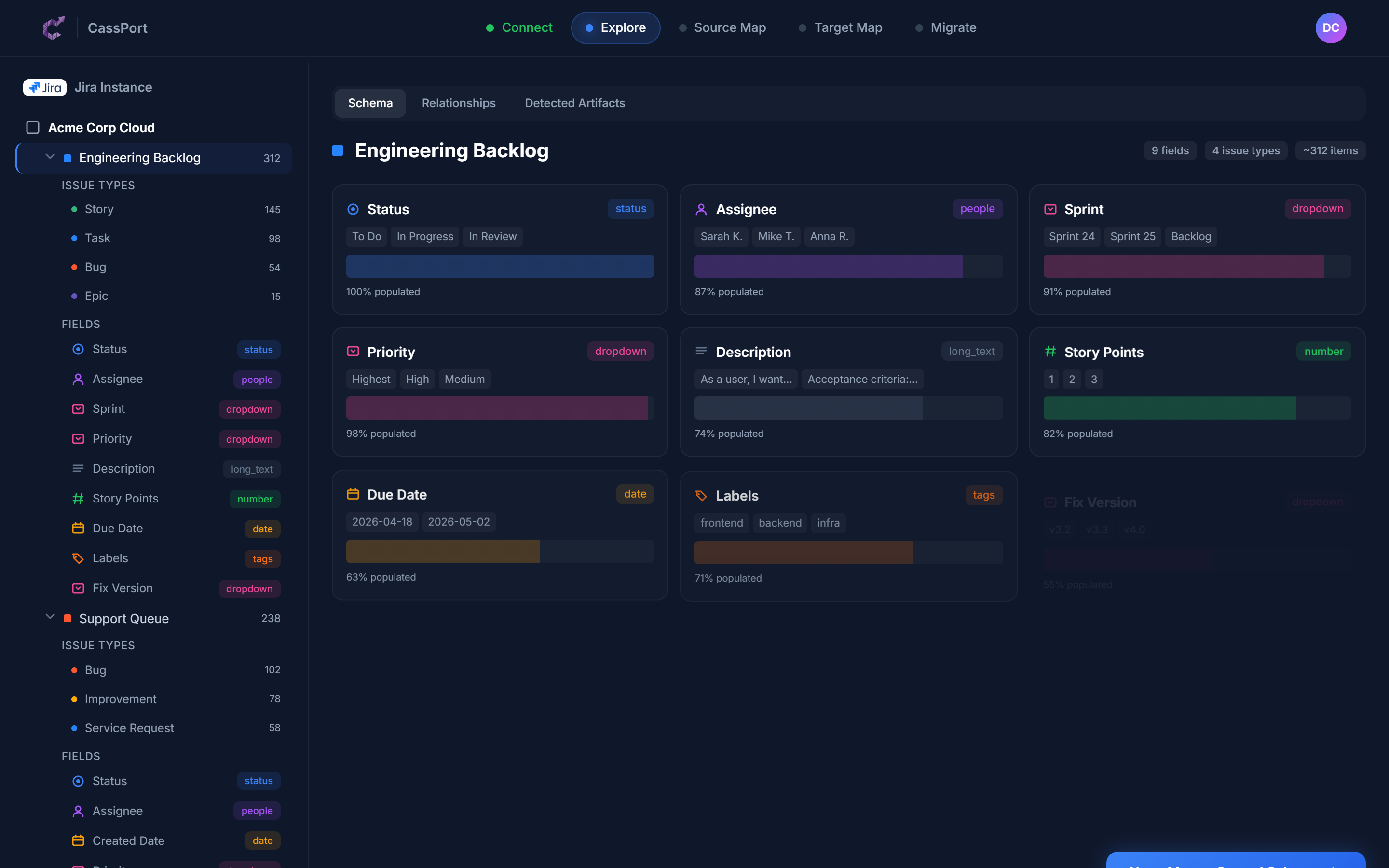
A complete map of your Jira instance, generated in minutes
We design your new workspace
This is the step most migration providers skip entirely. Rather than dumping your Jira structure into ClickUp as-is, we sit down with your team and work through the hard questions. Which projects should share a Space? Do your epics work better as Lists or parent tasks? Are those 47 custom fields all still needed? Our tooling generates an initial field mapping using AI, translating Jira's 40+ field types through a central schema into their ClickUp equivalents. Your Cassidium consultant then refines it based on how your team actually operates. The result is a ClickUp workspace designed around your current needs, not a copy of configuration decisions made three years ago.
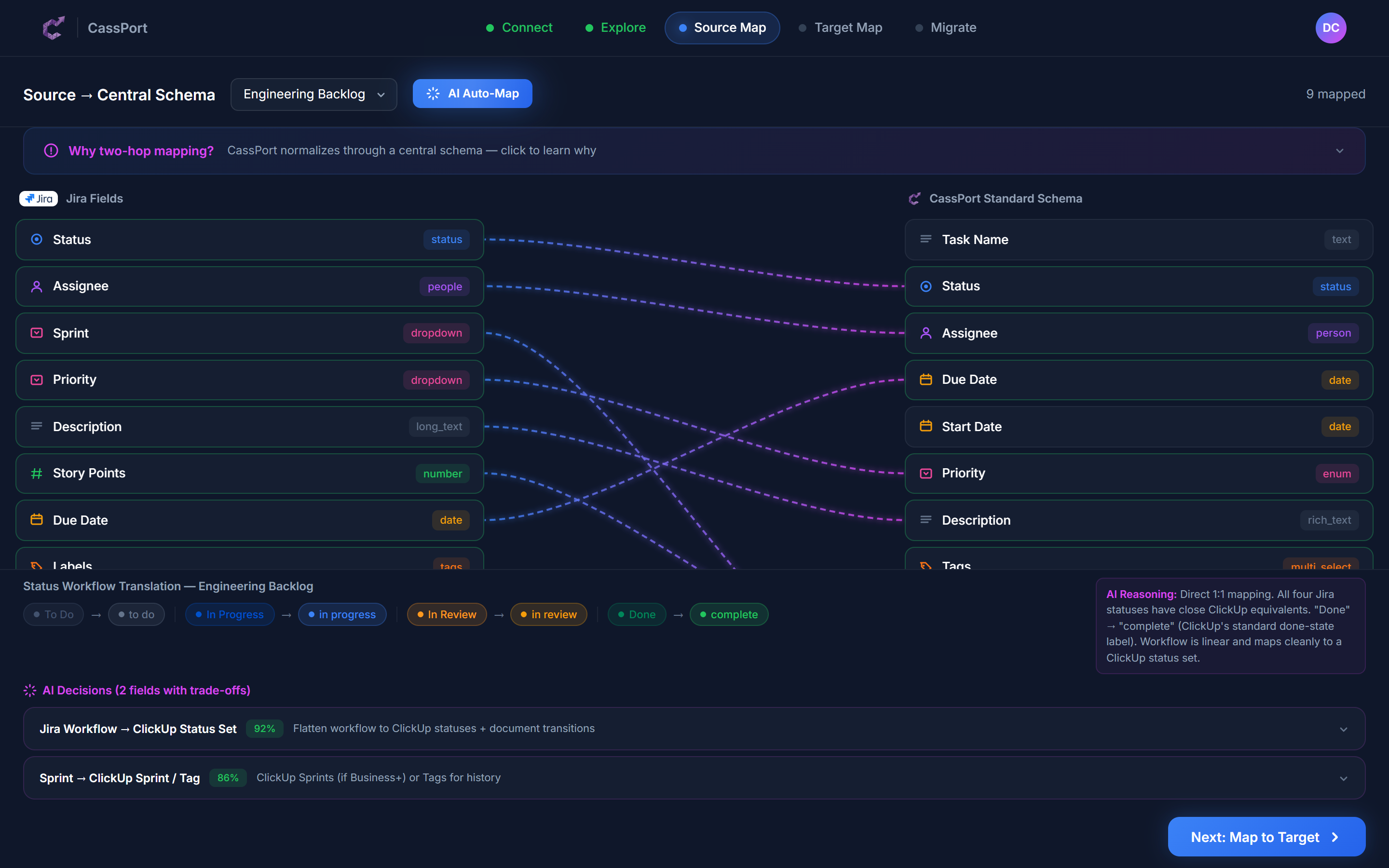
AI-powered field mapping with explainable decisions. Your consultant refines every recommendation.
You review and approve
Nothing moves until you are comfortable with where it is going. We walk your team through the proposed structure, explain every mapping decision, and adjust based on your feedback. Our tooling shows exactly where each piece of data will land in ClickUp, with confidence scores highlighting areas that need human judgement. This is also when we identify automations that need rebuilding, JQL filters that need translating, and marketplace apps that need replacing. By the time we start moving data, everyone knows exactly what the new workspace will look like and why.
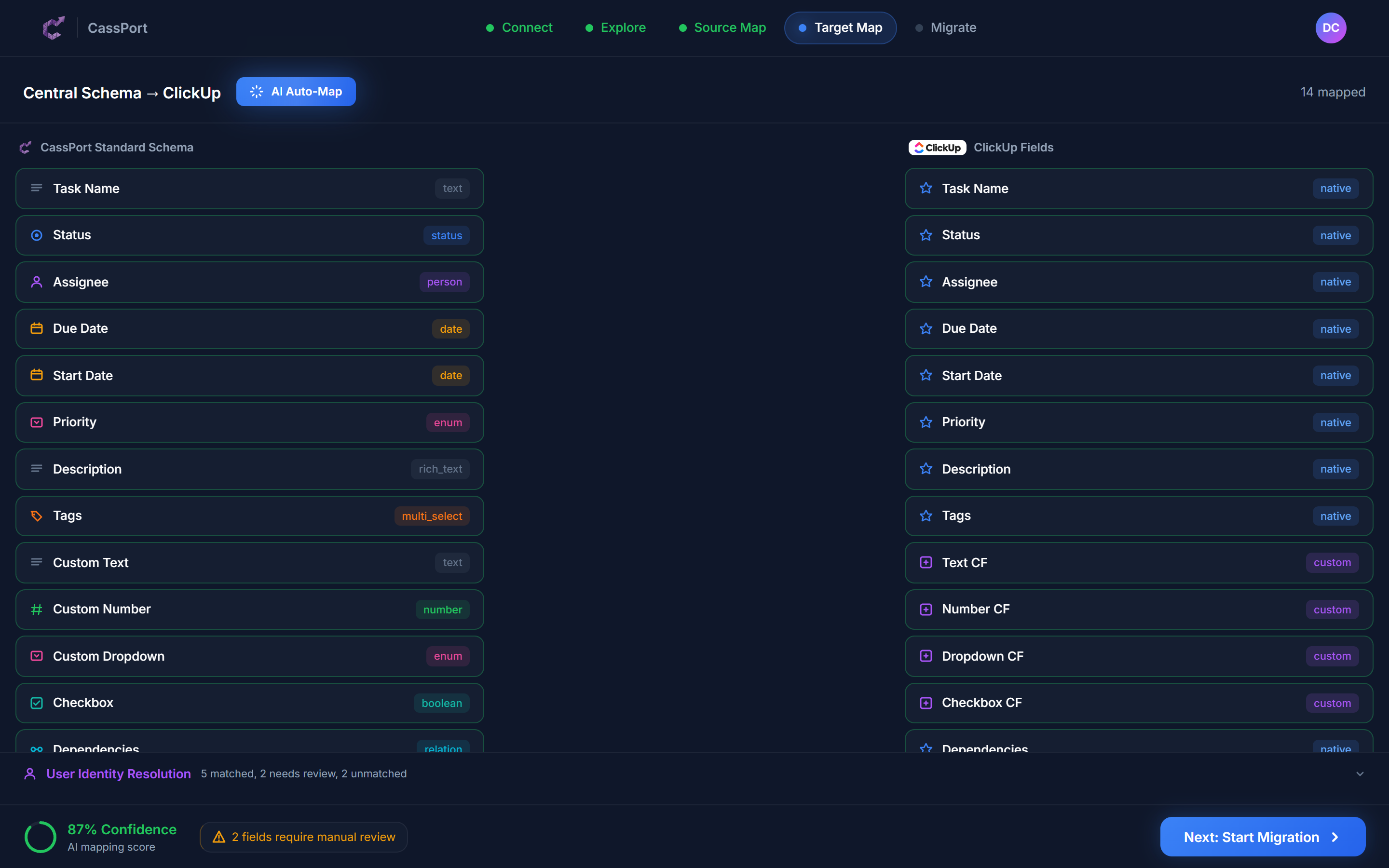
You see exactly where everything is going, with confidence scores for every mapping decision
We move your data and get your team live
Data moves across in controlled stages, not all at once. Every issue is tracked so if anything looks off, we can trace the source, fix it, or roll it back. Your team keeps working in Jira throughout the build-out and validation phases. When it is time to cut over, we schedule a brief freeze window so we can move the final data cleanly, without chasing a moving target. We reconnect your integrations, rebuild your automations, translate your key JQL filters, and run your team through the new workspace so they are confident before the switch.
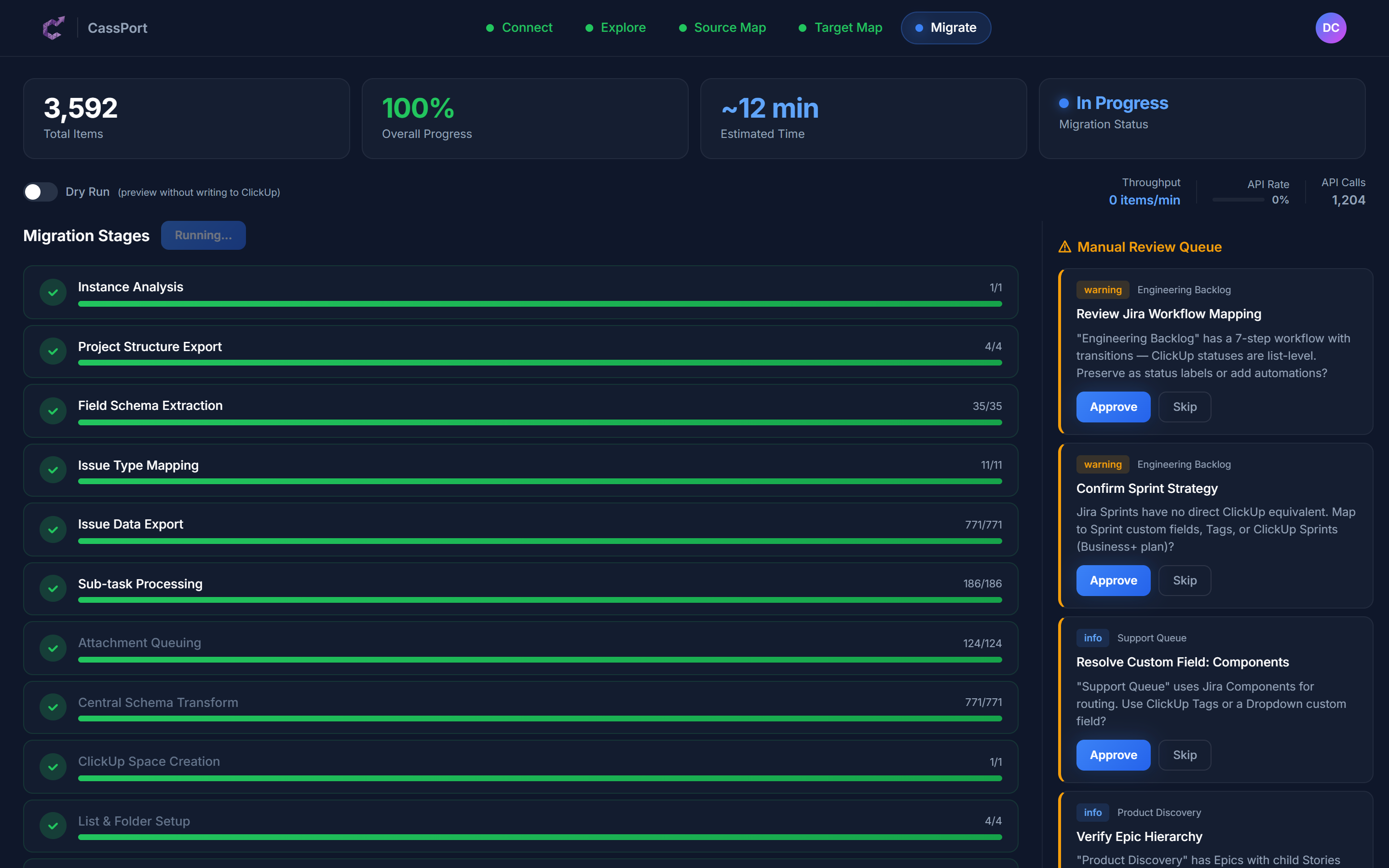
Every stage tracked, every record accounted for
Your Safety Net
Jira migrations carry real risk, especially for teams with years of accumulated data and configuration. We have built our process to reduce that risk at every step.
Nothing is permanent until you say so
Every issue we move is tracked. If something does not look right in ClickUp, we can trace it back to the original Jira issue, understand what happened, and reverse it. You are never stuck with a migration you are not happy with.
We check the numbers
After each phase, we verify that what landed in ClickUp matches what left Jira. Issue counts, attachment counts, comment counts, sub-task counts: everything is cross-checked before we move on.
Every record is logged
We track what was created, what was updated, what was skipped, and why. If a question comes up three months later about where a specific issue went, we have the answer.
Your other tools keep working
Jira does not exist in isolation. We find every connected system, CI/CD pipeline, Slack integration, and third-party tool, and reconnect them to ClickUp. Whether that means a native integration, a Make.com workflow, or a custom webhook, nothing in your stack gets left behind.
Direct line to ClickUp
As a ClickUp Certified Partner, we have direct access to ClickUp's engineering and support teams. If something unusual comes up during your migration, we escalate it directly rather than waiting in a queue.
We are here after go-live
Every migration includes a support window after launch. If your team hits a snag, has questions, or wants to adjust how something is set up, we are still available. Adoption is part of the job, not extra.
What Moves Where
Jira and ClickUp have fundamentally different data models. Jira organises work around projects, issue types, and deeply nested schemes. ClickUp uses Spaces, Folders, and Lists with flexible custom fields. Here is how the pieces translate.
Small projects become Folders. Large standalone projects become their own Space. We recommend the right structure based on how your teams interact.
All issues, with descriptions, dates, assignees, and comments, come across intact
Parent-child relationships stay connected
Epics can become Lists (grouping related tasks) or parent tasks depending on how your team uses them. We work through this with you.
Jira's issue type system (Story, Bug, Task, etc.) maps to ClickUp task types or a combination of tags and custom fields. We preserve the distinction without adding unnecessary complexity.
Your workflow transitions and status categories translate to ClickUp statuses. Multi-step approval flows and conditional transitions need rethinking in ClickUp's simpler model.
Active and future sprints migrate directly. Historical sprint data is preserved as tags or archived sprints.
Your estimation data carries over to ClickUp's native sprint points
Most Jira custom field types have a direct ClickUp equivalent. Cascading selects and some advanced types need rebuilding.
Jira components do not have a direct equivalent. We map them to tags, a custom dropdown, or folder structure depending on how your team uses them.
Version tracking is rebuilt using ClickUp milestones or a custom field, depending on how tightly you track releases.
Labels map directly to ClickUp tags
All files move across. No manual re-uploading.
Full conversation history with timestamps preserved
Board configurations are recreated in ClickUp's native views with matching columns and swim lanes
Saved JQL queries need translating into ClickUp's filter system. We document every filter and rebuild the ones your team actually uses.
Cannot be copied directly. We document every automation rule and rebuild them in ClickUp's automation engine.
Your reporting needs are captured and rebuilt using ClickUp's native dashboard widgets.
What Comes Across Cleanly
Your issues and all their details
Summaries, descriptions, assignees, reporters, priorities, due dates, and time tracking data all arrive exactly as they were. Your day-to-day work data does not change.
Sprint structure and estimation
Active and future sprints move across with their story point values intact. Your velocity history is preserved so you do not lose continuity in planning.
Attached files and documents
Every screenshot, spec document, and file attached to an issue moves to the right task in ClickUp. Nobody has to re-upload anything.
Conversation history
Comments on issues, including inline mentions and formatted text, become ClickUp comments. The full thread is preserved with original dates and authors.
Labels and basic categorisation
Your labels translate directly to ClickUp tags, keeping your existing categorisation system intact from day one.
Task relationships and dependencies
Parent-child links (epics to stories, stories to sub-tasks) and issue links (blocks, is blocked by, relates to) carry over so your dependency chains stay visible.
What Needs Rethinking
Jira and ClickUp have fundamentally different philosophies. Jira is scheme-driven and admin-controlled. ClickUp is flexible and user-configured. These differences mean some concepts cannot be copied, they need to be redesigned. This is where our experience matters most.
Project and hierarchy structure
Jira keeps things relatively flat: projects with issue types and optional components. ClickUp gives you Spaces, Folders, and Lists. A Jira instance with 15 projects, each with 4 issue types, needs careful mapping to avoid a cluttered ClickUp workspace. We look at how your teams actually collaborate and design the right structure.
Workflows and transitions
Jira workflows can have dozens of statuses, conditional transitions, validators, and post-functions. ClickUp statuses are simpler by design. We work through every workflow, identify what the transitions actually accomplish for your team, and rebuild them in a way that works in ClickUp without losing the guardrails you rely on.
Issue type schemes
In Jira, issue types are configured per project with their own screens, fields, and workflows. ClickUp uses task types more loosely. We determine which distinctions matter to your team and which were just inherited complexity, then map accordingly.
JQL queries and saved filters
If your team relies on complex JQL filters for daily work, those need translating into ClickUp's filter and view system. We document every active filter and rebuild the ones people actually depend on.
Permission schemes and roles
Jira's granular permission model (project roles, issue-level security, scheme-based access) does not translate directly. We map your access requirements to ClickUp's Space and Folder permissions, flagging any gaps.
What Does Not Survive (and What We Do About It)
We would rather tell you this upfront than have you find out after the fact. Here is what genuinely cannot carry across from Jira, and how we make sure it does not cause problems.
Workflow transition history
The detailed log of every status change, who triggered it, and when, stays in Jira. ClickUp will track changes going forward, but the historical audit trail does not migrate.
We export a complete transition history for every issue before migration starts, giving you an archived reference for compliance or audit purposes.
Automation rule history
Logs of past automation executions remain in Jira. You will not see historical rule triggers in ClickUp.
We export automation activity summaries and rebuild every active rule in ClickUp's automation engine, often improving on the original.
Jira apps and marketplace integrations
Any Jira marketplace app (Tempo, Zephyr, BigPicture, ScriptRunner, etc.) stops working. Data stored exclusively in those apps needs separate handling.
We audit every installed app before migration. For each one, we identify whether the data can be exported, whether ClickUp has a native equivalent, or whether a third-party tool like Make.com can bridge the gap.
Screen schemes and field configurations
Jira's admin-configured screens (which fields appear on create vs edit vs view) do not have an equivalent in ClickUp.
We document the intent behind each screen configuration and set up ClickUp's field visibility and required fields to achieve the same result.
Confluence deep links
Issues that link to Confluence pages will lose those connections. Confluence stays where it is, but the bidirectional linking breaks.
We catalogue every Confluence-linked issue and add the URLs as task description links or a custom field in ClickUp, so nothing goes missing.
How Long It Takes
Jira migrations tend to be more complex than other platforms because of the layered scheme system and deep customisation. Timelines depend on the number of projects, the complexity of your workflows, and how many marketplace apps need replacing.
Standard
Up to 50 users
A focused Jira instance with fewer than 10 projects, standard workflows, and minimal marketplace apps. Common for teams using Jira for straightforward sprint-based development.
Complex
50 to 200 users
Multiple projects with customised workflows, advanced field configurations, JQL-dependent reporting, and integrations with CI/CD tools. The typical mid-market Jira migration.
Enterprise
200+ users
Large Jira instances spanning multiple teams or business units, heavy marketplace app usage (Tempo, Zephyr, BigPicture), complex permission schemes, and a phased rollout across departments.
Frequently asked questions
Common questions about jira to clickup migration.
How long will the migration take?
Most Jira migrations complete within 3 to 10 weeks. A smaller team with a straightforward setup can be done in 3 to 5 weeks. Larger organisations with complex workflows, marketplace apps, and multiple projects typically need 10 to 16 weeks, including time for your team to validate the new workspace before going live.
Will we lose any data?
Your core work data transfers completely: issues, descriptions, comments, attachments, sprint data, story points, and relationships. The things that do not carry over are Jira-specific platform features like workflow transition logs, automation execution history, and data stored exclusively inside marketplace apps. We document everything before we start and archive what cannot transfer.
Can my team keep working in Jira during the migration?
Yes, for most of the process. Your team keeps working in Jira while we build and validate the ClickUp environment. When it is time to cut over, we schedule a short freeze window, typically a day or two, so we can move the final data without chasing changes.
What happens to our Jira workflows?
Jira workflows cannot be copied directly because the two platforms handle statuses and transitions differently. We go through every workflow, understand what each transition accomplishes, and rebuild the equivalent in ClickUp. In many cases, the simpler model means fewer bottlenecks for your team.
What about our Jira marketplace apps?
We audit every installed app before migration. For each one, we identify whether ClickUp has a native equivalent, whether the data can be exported and brought across, or whether a third-party integration can bridge the gap. Apps like Tempo (time tracking), Zephyr (test management), and ScriptRunner (automation) all have migration paths we have handled before.
How do epics and issue types translate?
Epics can become ClickUp Lists (grouping related tasks), parent tasks, or a custom field depending on how your team uses them. Issue types (Story, Bug, Task) translate to ClickUp task types or tags. We work through the options with you and recommend the approach that best fits your workflow.
What about our JQL filters and saved searches?
We document every active JQL filter and translate the ones your team depends on into ClickUp's filter and saved view system. Complex JQL queries sometimes need rethinking, but the end result is the same: your team can find what they need quickly.
What if something goes wrong?
Every record we move is tracked. If something does not look right, we can trace it back to the original Jira issue, understand what happened, and reverse it. We also run verification checks after each phase to make sure the numbers match before moving on.
Do you just copy everything as-is?
No, and that is especially important with Jira. Jira instances accumulate years of scheme configurations, unused issue types, deprecated workflows, and custom fields nobody remembers creating. We work with your team to design a ClickUp workspace that fits how you work now, cleaning up the inherited complexity in the process.
What ClickUp plan do we need?
For teams migrating from Jira, we usually recommend ClickUp Business or Enterprise. Business covers custom fields, automations, sprints, and dashboards. Enterprise adds advanced permissions and SSO, which Jira teams often rely on. Your consultant will advise based on your current Jira setup.
Ready to move from Jira to ClickUp?
Tell us about your setup and we will scope the migration, give you a realistic timeline, and walk you through exactly how it works. No commitment required.
Start the Conversation
Tell us about your challenges and we'll reach out to see if we can help. No commitment required.